What's new?
1. Aline Help Center
The Aline Help Center is now available in Aline Revenue! To access the Help Center, click on the launcher icon located at the bottom of your screen:
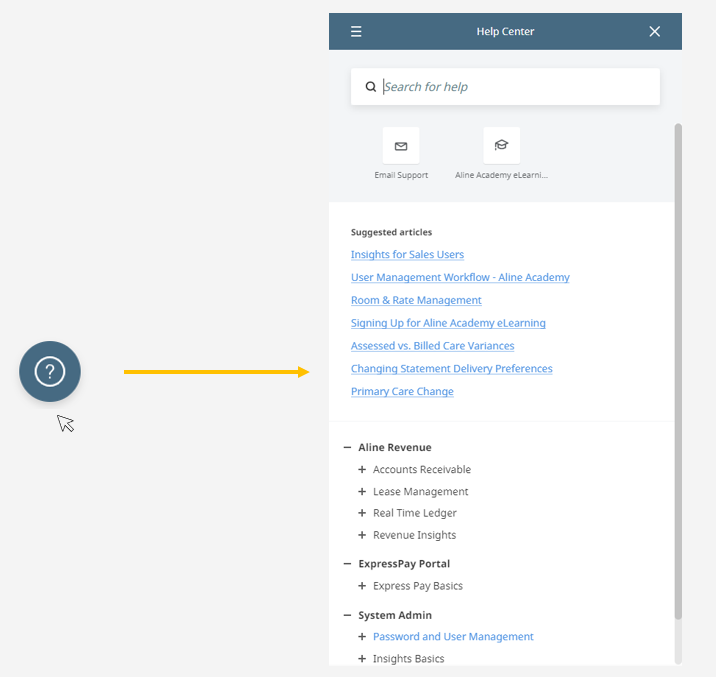
- Use the search bar to type in keywords related to your query. The Help Center will provide relevant articles and answers based on your search. You can also explore the knowledgebase without leaving Aline Revenue.
- Access Aline Academy (eLearning).
- Can't find what you're looking for? No problem! Contact our Support Team directly from the Help Center panel.
The Help Center is regularly updated with new articles and information to provide you with the latest resources to be successful.
2. Resident Notes in Revenue
Add notes to a Resident's lease in Revenue. Notes are detailed records documenting various aspects of Resident's stay at your community that relate to their lease and ledger in Aline Revenue.
Learn more about Resident Notes in Aline Revenue.
3. Recurring Resident Payments
Set up recurring payments that feed into the Aging Report and Bulk Payments panel. A Resident's recurring payments will be visible on the Resident Dashboard.
Learn more about Recurring Resident Payments.
Updated
4. Minimum Balances for Late Fees
Late Fees can now be configured to not apply until the outstanding balance has a minimum threshold amount.
Learn more about Late Fee Minimum Balances.
5. Supplemental Payor Enhancements
The Supplemental Payor Report now contains new fields:
- Authentication Date
- Recertification Date
Learn more about the Supplemental Payor Enhancements.
6. GL Export (Intacct, Great Plains, Acumatica)
You can now export bulk or custom-defined batches of unsent records to your Financial Platform. The update now includes tracking line-number and dates as well as any records marked as finalized/transmitted. Only new, unsent, subsequent items will be available to batch and sending in each Accounting period.
Learn more about the GL Export.
6. Updates to the Aging Report and Move In/Out Report
The updated Aging Report Six Month now includes additional fields:
- Payor
- Recurring (denotes what type of recurring payment there is on the Resident's account)
- 90 to 120 Days
- Over 120 Days
The updated Aging Report Monthly shows aging by month and includes additional fields:
- Room
- Move In Date
- Move Out Date
- Payor
- Recurring
- Notes
Learn more about the Aging Report updates.
Was this article helpful?
That’s Great!
Thank you for your feedback
Sorry! We couldn't be helpful
Thank you for your feedback
Feedback sent
We appreciate your effort and will try to fix the article