Overview
In this article, we will review resident payments.
Resident Payments
After distributing statements to residents and/or resident payors, Aline Revenue is ready to receive resident payments. Communities utilizing Aline Payments will automatically receive resident payment data once per day.
Communities that are not utilizing the Payments application that interfaces with Revenue will need to manually enter resident payment data via the Resident Payments tool.
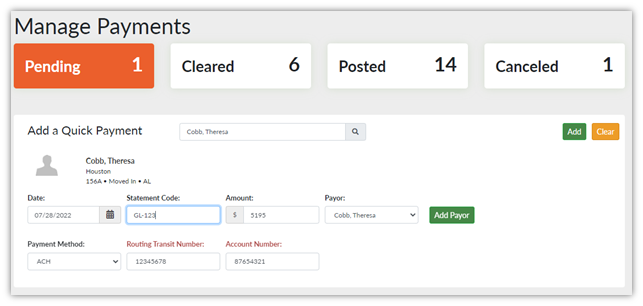
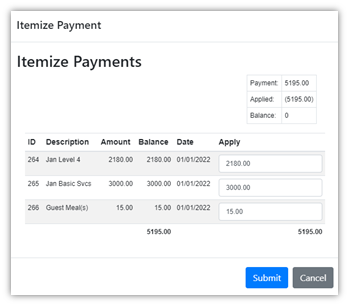
Each payment manually entered into the Manage Payments tool must include a resident name, the payment date, the appropriate statement code, the payment amount, and the payment method.
Resident payments can then be itemized to their specific charges, edited, or deleted. Once the payment details have been completed and reviewed, the payments should then be cleared. Cleared payments will automatically post to the resident’s account once every hour.

Resident Payments Video
Was this article helpful?
That’s Great!
Thank you for your feedback
Sorry! We couldn't be helpful
Thank you for your feedback
Feedback sent
We appreciate your effort and will try to fix the article