Rate Increase Outlook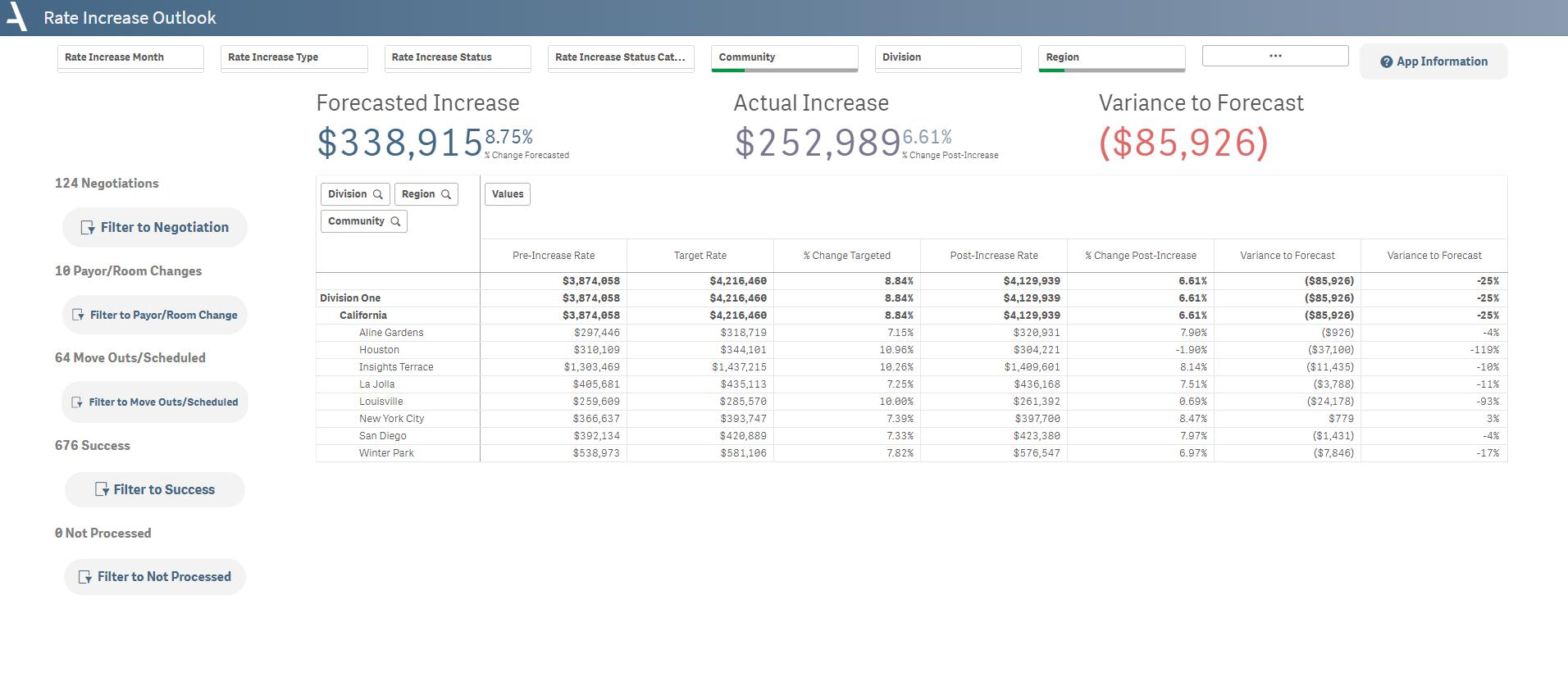
The Rate Increase Outlook sheet presents an organized view of key rate change metrics at the community level.
- Obtain a bird's-eye view of rate changes before and after increases across all communities, along with variances to forecasted figures.
- Understand the targeted and actual percent changes in rates for each community.
- Pinpoint areas that require closer scrutiny or targeted intervention.
- Evaluate the precision of your forecasting model by comparing the variance between targeted and actual rate changes.
Layout Tips
The buttons along the left-hand side filter the app to different statuses in the rate increase process.
Questions to get started
Which communities had significant discrepancies between targeted and actual post-increase rates?
- By reviewing the Variance to Forecast columns in the pivot table, you can spot the communities with the largest discrepancies.
How accurate are our rate increase forecasts across all communities?
- To assess this, look at the overall variance to forecast percentages. You can also break this down by community to see where forecast accuracy may vary.
Was this article helpful?
That’s Great!
Thank you for your feedback
Sorry! We couldn't be helpful
Thank you for your feedback
Feedback sent
We appreciate your effort and will try to fix the article