Overview
In this article, we will review the resident level detail.
Resident Level Detail
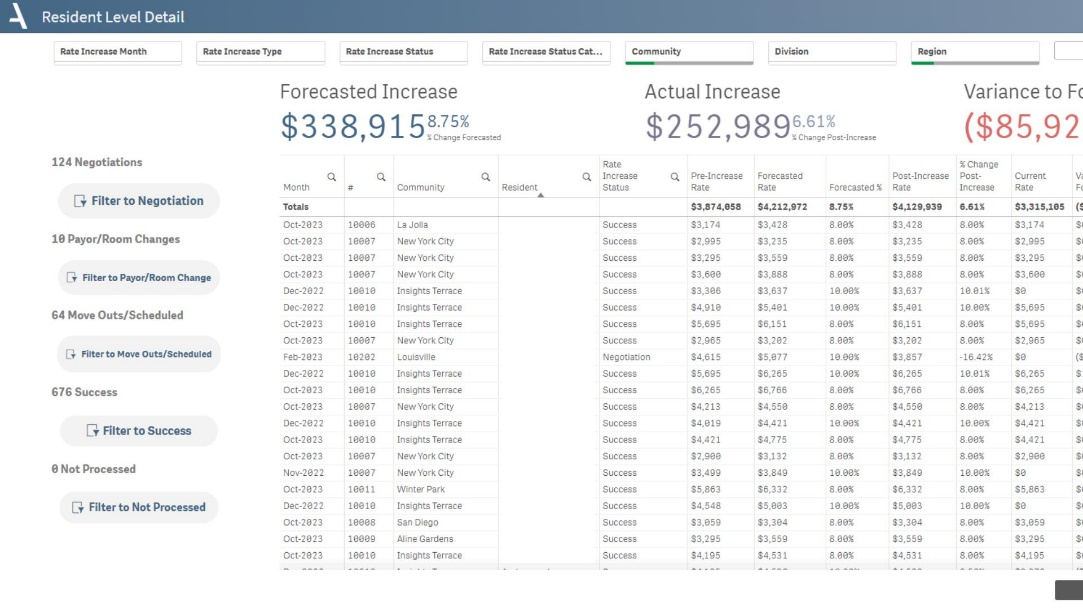
Understand the implications of rate increases on individual residents.
- Compare pre-increase rates and forecasted rates to anticipated changes in pricing.
- Track actual post-increase rates and their percentage change to measure the real impact of rate increases.
- Use current rates and variances to forecast to evaluate the accuracy of predictions and the financial impacts of the rate increase.
- View either resident totals, or toggle to view detail by rate increase type.
Layout Tips
- You have to select at least one month or community in order the table to populate.
- The buttons along the left-hand side filter the app to different statuses in the rate increase process.
- Toggle the buttons at the bottom to view either total resident increase, or by increase type (Rent, Care, and Other Billing)
Questions to Get Started
How much revenue am I losing due to Rate Increases resulting in move-outs?
- Using the filter pane, select Moved Out from the Rate Increase dropdown. Across the top, in the Totals row, find the summary metric in the Variance to Forecast column.
What was the highest increase we were able to achieve in the last rate increase season?
- Using the filter pane, filter to the rate increase month you'd like to analyze. Then, utilize the buttons on the left-most side to filter to Success. Then, click the Variance to Forecast column to sort from largest to smallest.
Was this article helpful?
That’s Great!
Thank you for your feedback
Sorry! We couldn't be helpful
Thank you for your feedback
Feedback sent
We appreciate your effort and will try to fix the article