Overview
In this article, we will review how to find information on move ins and move outs.
Finding Information on Move Ins and Move Outs
To display data about which community in their portfolio has the most move ins and which communities have the most move outs in the current month, users can access the sheet called Pending Resident Move ins and Move Outs.
To access this sheet, users should select the Aline Revenue Stream, the Revenue App, and then the sheet named Pending Resident Move ins and Move Outs.
The data set can potentially answer questions such as:
- Which communities or regions had the most potential resident move ins or move outs in a month?
- Which communities or regions have adequate or inadequate rent and care revenue?
- How many move ins / move outs were auto applied, processed, or reserved?
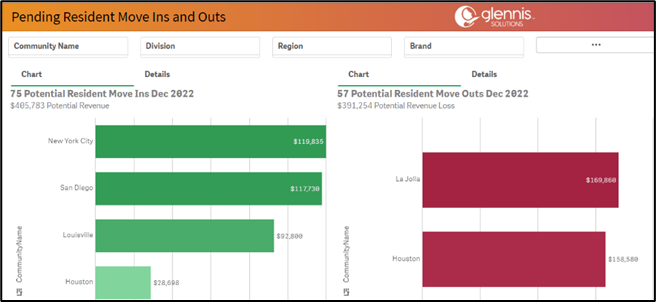
Here users can see which community in their portfolio has the most move ins and which communities have the most move outs in the current month. According to the data in the sample, the New York and San Diego communities have the most move ins, while La Jolla and Houston have the most potenial move outs.
Users can also drill down into specific regions, divisions, or communities by the using the Filter Pane at the top of the sheet.
Where Can I Find Historical Information about Move Ins and Move Outs?
To view past trends for move ins and move outs, users have two sheets available to display this data: Move In History and Move Out History.
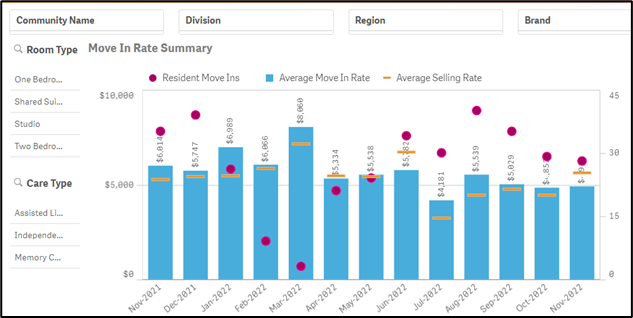
These sheets can potentially answer questions like which room types have the most or least move ins per month, and which care types have the most or least moves in per month. Move Out History displays the same data sets as Move In History, but only focuses on move outs and not move ins. The data from these sheets is fed directly from the sheet called Move in / out Detail, and allows users to view data related to each specific move in / move out.
Where Can I Find Data About Assessed Versus Billed Care Variances?
The sheet Assessed v Billed Care consists of information regarding the care level costs after all residents’ assessments with respect to the actual cost currently being billed.
The first data set shows the total number of variances in a portfolio, and then breaks down those variances at a community-by-community level.
The second data set shows the average variance per resident along with a breakdown of rate variances within each community. The final data set displays a monthly reconciliation total – or the total amount of revenue to be expected were all communities to resolve their assessed vs billed care variances.
Selecting a community from the first data set updates data on the other charts for just that single community. Remember to always make selections within the various data sets to see additional details about a singular community or selected groupings of communities.
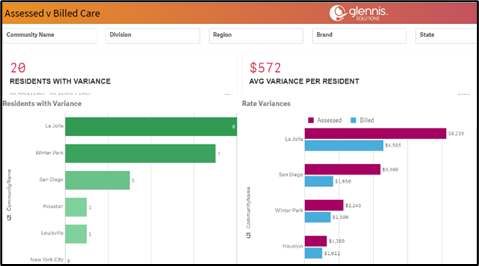
This sheet displays data related to these variances and can also potentially answer questions such as:
- Which communities have large variances with respect with assessed vs billed care?
- Which communities have the highest revenue potential via reconciliation of assessed vs billed care variances?
- Are there any residents who are billed at a higher level than they are assessed for?
Was this article helpful?
That’s Great!
Thank you for your feedback
Sorry! We couldn't be helpful
Thank you for your feedback
Feedback sent
We appreciate your effort and will try to fix the article