Overview
In this article, we will review the move-in/out detail.
Move-In/Out Detail
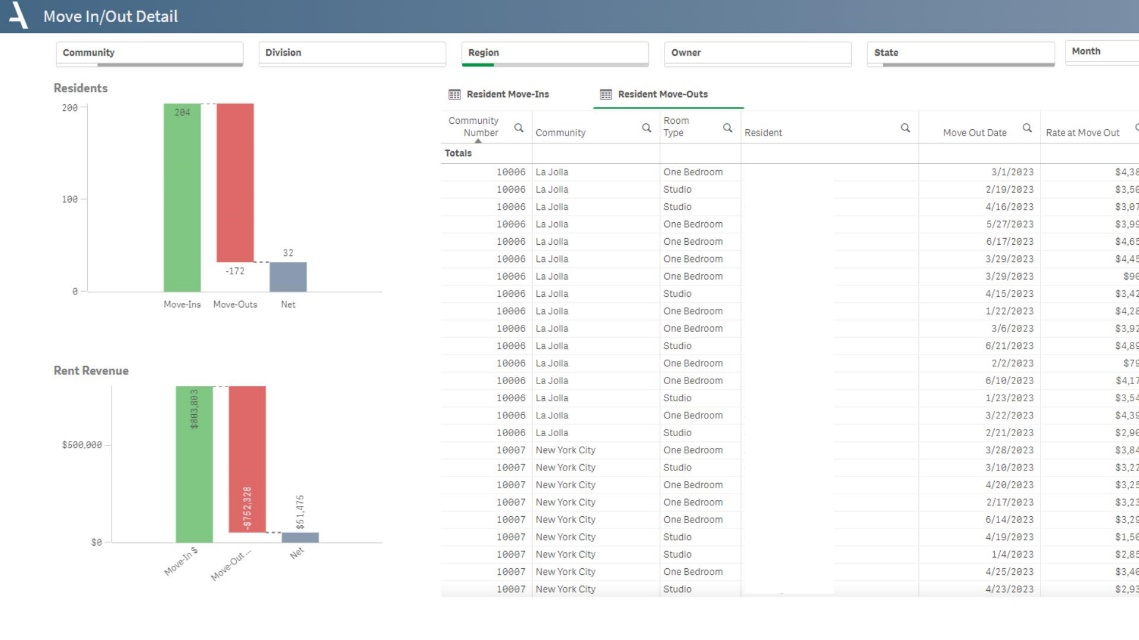
The Move-In and Out Details sheet provides an in-depth look into the move-ins and move-outs, along with their respective rent and care rates year-to-date.
- Visualize the net effect of move-ins and move-outs with waterfall charts depicting both the count of residents and the impact on rent revenue.
- Explore detailed tables showcasing individual move-in and move-out events, inclusive of community, room type, resident, date, and rates.
- Uncover reasons for move-outs to better understand patterns and trends
Layout Tips
- The charts default to displaying data for the current month
- To view Rent Roll data for a specific period, select a month from the line chart axis.
Questions to Get Started
Are there any move-outs scheduled for a specific community?
- To find this, first filter to your desired community. Locate the 'Today's Rent Roll' table and sort the Move Out Date column to bring dates to the top. If any upcoming dates are displayed, these indicate scheduled move-outs.
How has the Rent to Selling Rate varied over time for a specific community?
- You can use the line chart to understand this. Select your desired community from the filter and observe the trend line on the chart. This will provide a visual representation of the variance over the trailing year.
Was this article helpful?
That’s Great!
Thank you for your feedback
Sorry! We couldn't be helpful
Thank you for your feedback
Feedback sent
We appreciate your effort and will try to fix the article