Overview
In this article, we will review pending resident move-ins and outs.
Pending Resident Move-Ins and Outs
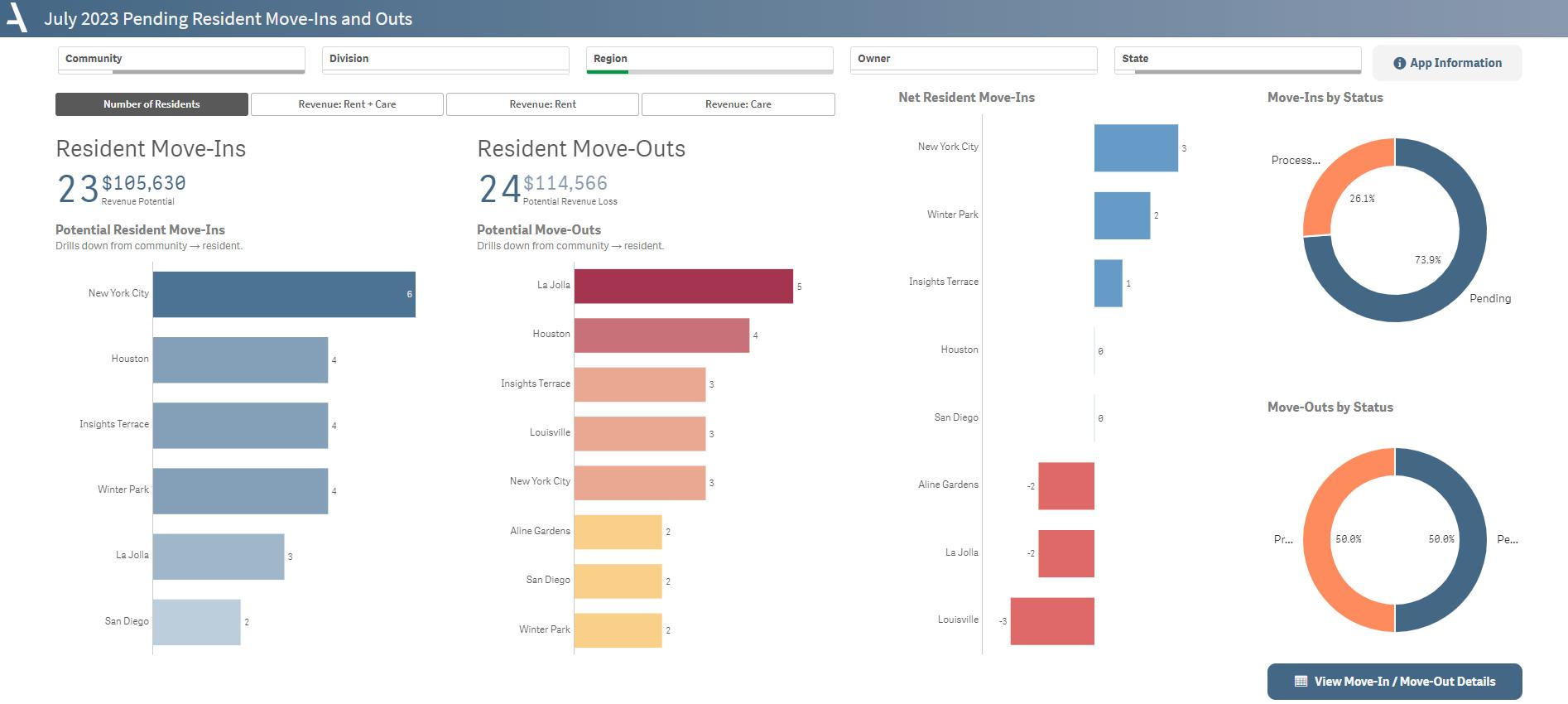
The Pending Move-Ins and Outs sheet provides a snapshot of the expected resident movement and its potential impact on revenue for the current month.
- Get ahead of potential revenue loss with data on scheduled and completed move-outs, including insights on community and resident-level impacts.
- Identify net resident changes and their potential revenue impact, providing valuable context for financial planning.
- Review move-in and move-out statuses via pie charts to understand the overall transition landscape within your communities.
- Layout Tips
- The buttons between the KPIs and the filter pane allow you to toggle the measure between number of residents, total revenue, care revenue, and rent revenue. Or, in the case of move-outs, revenue loss.
- The details button navigates to a sheet with resident-level move-in and out details.
Questions to Get Started
Which community is projected to have the lowest net occupancy for the month?
- To identify the community with the lowest net occupancy, refer to the Net Move-Ins graph and locate the community listed at the bottom.
Does the same community experience the highest revenue loss?
- Click on the Rent + Care Revenue button beneath the filter pane. If the same community appears at the bottom of the Net Move-Ins graph, it indicates a significant decline in revenue.
Was this article helpful?
That’s Great!
Thank you for your feedback
Sorry! We couldn't be helpful
Thank you for your feedback
Feedback sent
We appreciate your effort and will try to fix the article