Overview
In this article, we will review rate lock.
Rate Lock
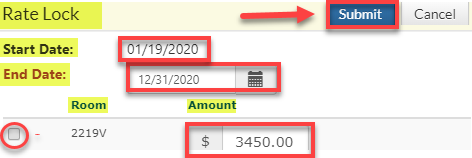
Step 1: Provide the Start Date, End Date, and Amount.
Step 2: Use the check box at the bottom to indicate the Rate Lock is for the correct Room.
Step 3: Click Submit when finished.
Was this article helpful?
That’s Great!
Thank you for your feedback
Sorry! We couldn't be helpful
Thank you for your feedback
Feedback sent
We appreciate your effort and will try to fix the article