Overview
Get a snapshot of community demographics, upcoming events, and resident diagnosis to ease community monitoring and planning. The acuity app fosters a well-informed strategy for community management. The Acuity App includes three specific reports: Demographic Overview, Resident Analysis, and Resident Details.
Note: the reports are all on a standardized refresh schedule. Check the Last Refresh date to know when the report was last updated.
Demographic Overview Report
See a quick overview of your resident population with demographic details like total population, median stay length, upcoming events (like birthdays, move ins, and move outs), resident population by care type, and population by age and gender.
Data can also be exported, filtered, and drilled down. For example, users could select AL in the Resident Population by Care Type chart in order to view the rest of the charts and graphs reflect only those residents who are living in AL.
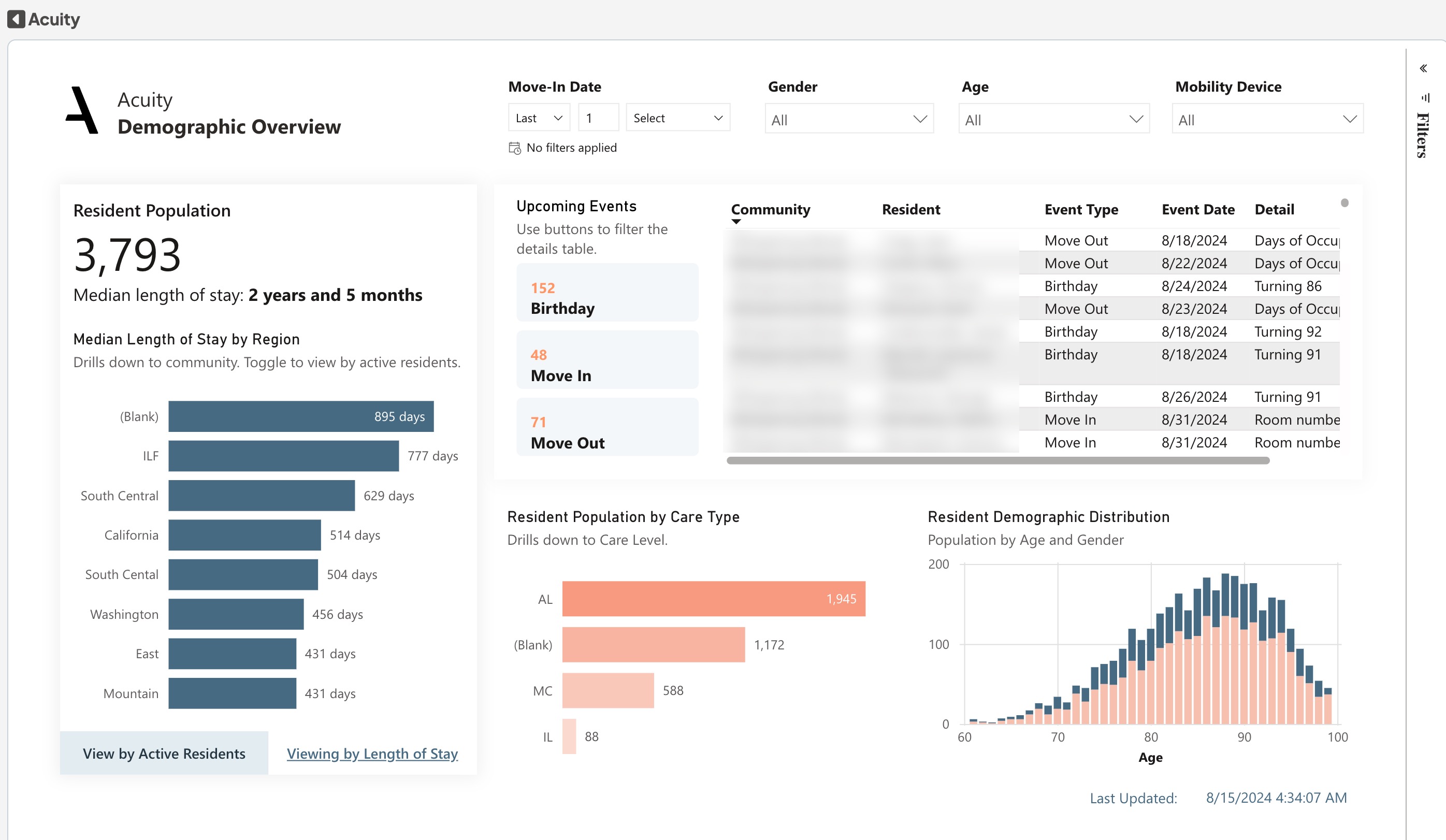
The Key Performance Indicators (KP|s) at the top of the page give an at-a-glance overview of the number of active
residents, upcoming move outs, move ins, and birthdays.
Reference the table for details, enabling anticipation and efficient planning of transitions and celebrations. Look at the Resident Population by Assessed Care Type bar chart on the left to understand the distribution of care levels and care types in your community. The Resident Demographic Distribution Column Chart gives you a clear picture of residents by age group and gender.
Dimensions:
- Drill-down Dimensions from Region to Community
- Drill-down Dimensions from Care Type to Care Level
Demographic Overview Metrics & Their Definitions
- Resident Population: The number of residents currently living in the community
- Birthday: The number of resident birthdays that will occur in the next seven days
- Move In: The number of residents scheduled to Move In into a community in the next 14 days
- Move Out: The number of residents scheduled to Move out from a community in the next 14 days
Resident Analysis Report
Uncover diagnosis distributions and resident diagnostic details. View resident population by mobility device and population analysis with indicators like "age is over X..." or "service type is X..."
Data can also be exported, filtered, and drilled down. For example, users could select a specific gender, move in date, diagnosis to hone in on, etc.
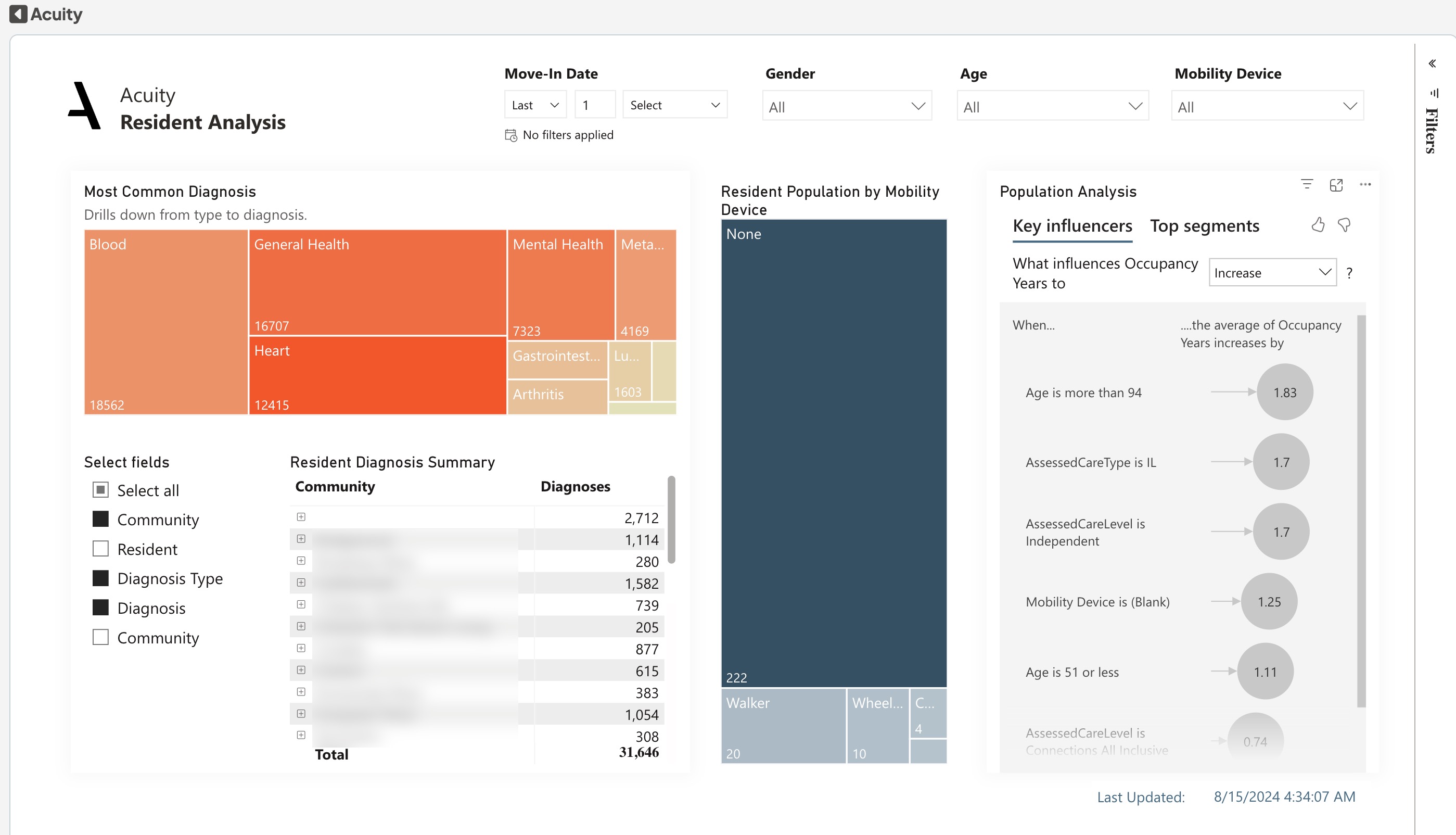
Use the 'Residents by Diagnosis Type' leaderboard on the left side of the page to get a feel for the different diagnoses among your residents. This can help you get a clear view of the overall health needs in your community.
Resident Diagnosis Summary dive deeper into the resident-level details - it shows how many diagnoses each resident has per type, and the details of each on community basis along with residents and the mobility devices they are using.
Resident Analysis Metrics & Their Definitions
- Resident Population: The number of residents currently living in the community
- Count of Customer ID: The total count of the customer ID key
Slicer: Community, Resident, Diagnosis Type and Diagnosis introduced to filter the necessary
Resident Details Report
Comprehensive resident details to streamline information access. Details include resident names, community, billing ID, care type, care level, age, gender, move in date, occupancy years, number of assigned diagnosis, and mobility devices.
Data can also be exported and filtered.

Use the Resident Details table to access information about each resident. The table includes Region, Community, Community Number, Resident Name, Care Type, Care Level, Age, Gender, Move-In Date, Occupancy Years, Diagnosis, and Mobility Device
Was this article helpful?
That’s Great!
Thank you for your feedback
Sorry! We couldn't be helpful
Thank you for your feedback
Feedback sent
We appreciate your effort and will try to fix the article