Overview
Sales Management reporting is designed for community-level users. The Sales Management app provides a daily snapshot of crucial metrics including a community's database, occupancy and other key factors, guiding staff on where to concentrate their efforts today.
Note: the reports are all on a standardized refresh schedule. Check the Last Refresh date to know when the report was last updated.
Today's Snapshot Report
Today's Snapshot provides an instantaneous update on your community's occupancy, available rooms, and inquiries by status.
1. The KPIs provide immediate insights into occupancy percentage, available room count, uncaptured revenue, and active inquiries.
2. A bar chart illustrates the occupancy percentage by care type, giving a visual understanding of occupancy distribution.
3. The 'Uncaptured Revenue by Care Type and Room Type' bar chart highlights potential revenue opportunities linked to available rooms.

Unit Occupancy Current: Percentage of rooms that are occupied, as of yesterday.
Occupancy by Care Type: Percentage of rooms that are occupied, as of yesterday, by Care Type.
Today's Available Rooms: The number of unoccupied rooms and half-occupied semi-private rooms. Offline rooms are excluded from this calculation. Half-occupied semi-private rooms are rooms occupied by a single Semi-Private Payor resident (indication the room could be shared). License capacity is not considered when counting half-occupied semi-private rooms.
Availability Reason: Number of rooms that are unoccupied or are a semi-private half-occupied
room. Half-occupied semi-private rooms are rooms occupied by a single Semi-Private Payor
resident and could have another occupant.
Uncaptured Revenue: Total potential revenue from unoccupied rooms and half-occupied semi-private rooms, based on the selling rate.
Uncaptured Revenue by care type and room style: Total potential revenue from unoccupied rooms and half-occupied semi-private rooms, based on the selling rate, broken out by Care Type and Room Type.
Active Database: The number of inquiries in an active selling status. Active selling status include
Cold, Hot, New Lead, ReEngaged, Reserved, Wait List, Warm
Active Database by Status: The number of inquiries in an active status.
Community Overview Report
Community Overview combines crucial sales metrics and trend-indicating graphs, providing a comprehensive understanding of the sales cycle.
1. Assess progress towards targets in Line of Sight, Tours, and Inquiries for informed strategy planning.
2. View bar charts to quickly identify trends in Move-Ins, Tours, and Inquiries, both Qualified and Not Qualified.
3. Evaluate the Rate Compliance KP| to gauge market rate selling effectiveness.
4. Monitor T30 Professional Move-Ins and Personal Move-Ins KPls for monthly goal alignment.
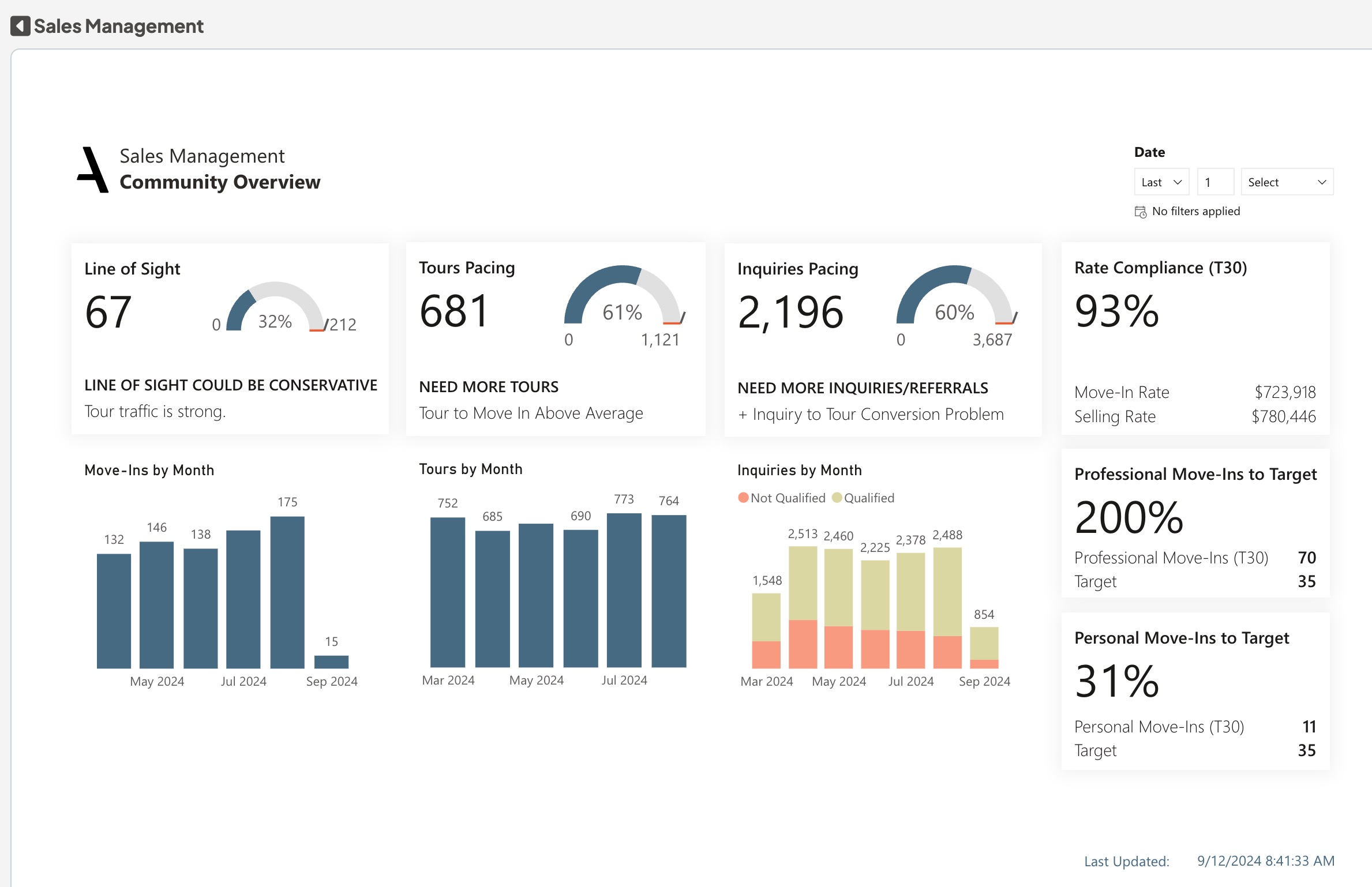
Line of Sight: The number of completed unit move-ins and reservations in the current month, as well as inquiries in closing status.
Line of Sight to Move In Target: The percentage of progress (line of sight) towards the Move-In target. Line of Sight is calculated as the number of completed unit move-ins and reservations in the current month, as well as inquiries in closing status.
Line of Sight Call Out: Compares Tour Forecast to Target progress to Line of Sight to Move-In Target progress. If tour Forecast to Target exceeds Line of Sight to Move-In Target, this suggests Line of Sight might be underestimated because tour traffic is strong. If Tour Forecast to Target is less than Line of Sight to Move-In Target, this suggests Line of Sight could be underestimated because the tour traffic is weak.
Move-Ins by Month: The number of unit move-ins in the last six months. A couple moving into one apartment is counted as a single unit move-in.
Tours Pacing: The expected number of tours for the current month, based on number of tours completed so far this month.
Tours Forecast to Target: The percentage of progress (Tour Forecast) towards the tour target for the current month. Tour Forecast is the expected number of tours for the current month, based on the number of tours completed so far this month. Tour Target is calculated using Move-In Target and trailing 3 month tour to move-in conversion percentage.
Tour Volume: If the pace of tours is less than 90% of the goal, it indicates a need to increase tour volume to reach the set target.
Tours Call Out: If the conversion rate from Tour to Move-In is less than 20%, this suggests an opportunity for improving the conversion process, "+ Tour to Move In Conversion Problem". If greater than 20% "Tour to Move-In Above Average".
Tours by month: The number of tours completed in the last 6 months, excluding cancelled and no show tours.
Inquiries Pacing: The expected number of inquiries for the current month, based on the number of inquiries so far this month.
Inquiry to Forecast Target: The percentage of progress (Inquiry Forecast) towards the inquiry target for the current month. Inquiry Forecast is the expected number of inquiries for the current month, based on the number of inquiries so far this month. Inquiry target is calculated using TourTarget and trailing 3 month inquiry to tour conversion percentage.
Inquiry Pacing Statement: If the page of the inquiries is less than 90% of the goal, it suggest a need to increase inquiry volume to meet the set target.
Inquiry to Tour Statement: If the conversion rate from inquiry to Tour is less than 40%, this suggests an opportunity for improving the conversion process.
Inquiries by Month: The number of Inquiries in the last 6 months broken out by qualification status. Not Qualified are 'Not Qualified' or 'Unable to Qualify'. Qualified are all others.
Rate of Compliance (T30): The percentage difference between the total move-in rate and the total selling rate, indicating how well communities are performing in terms of selling at the market rate.
Professional Move-Ins to Target: The number of resident move-ins from professional sources, such as rehab facilities or physicians, in the last 30 days. Professional move-ins can indicate a positive relationship or impression with local businesses.
Personal Move-Ins to Target: The number of resident move-ins that occurred due to a personal referral, such as a resident or employee, in the last 30 days. Personal move-ins can indicate positive customer and employee satisfaction.
Database Management Report
Database Management simplifies task prioritization for community-level sales managers, turning raw data into a daily action plan.
1. Five filter buttons labeled 'At Risk Inquiries', 'Past Due Activity', 'Active Inquiries w/o Next Step', '24 hr Tour Confirmation Missed', and '24hr ED Follow Up Missed', allow you to swiftly navigate through different areas of concern.
2. A community leaderboard dynamically reflects the number of inquiries based on the selected filter, providing a quick snapshot of community performance across various categories.
3. A detailed table presents granular insights into inquiries, with specifics changing according to the selected filter, making it a flexible tool for in-depth analysis.
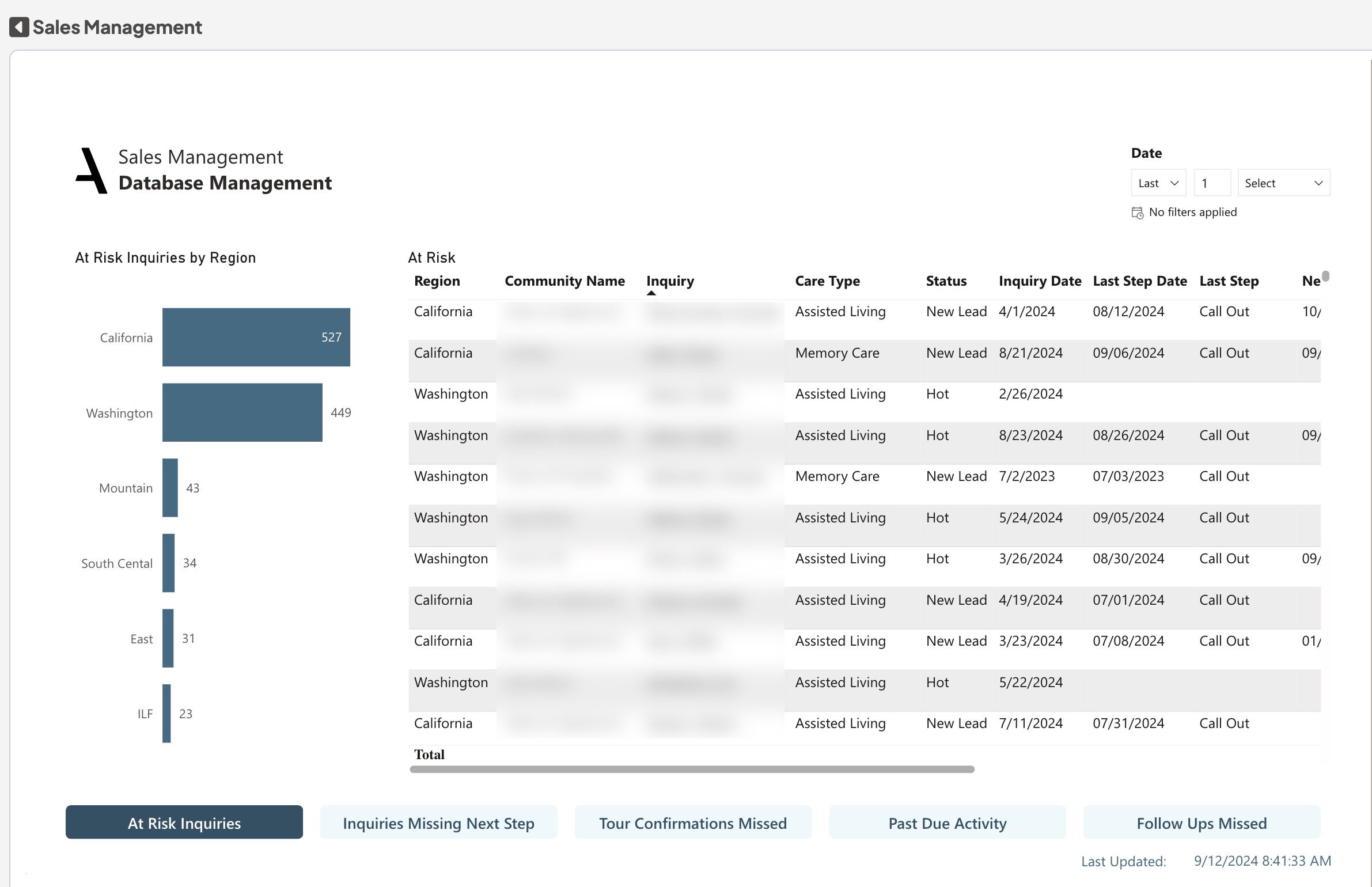
At Risk Inquiries: Hot, Closing and Reserved inquiries that have not be contacted in 7 days (AL/MC), 14 days (IL), or 21 days (Reserved at Unoccupied New Developments), as well as New Leads older than 14 days.
Inquiries missing next step: The number of inquiries in an active selling status that do not have a Next Step indicated in CRM. Active selling statuses include Cold, Hot, New Lead, ReEngaged, Reserved, Wait List, Warm.
Tour Confirmation Missed: Tours scheduled in the past 3 days or the upcoming 7 days that do not have a confirmation activity within 24hrs of their scheduled time.
Past Due Activity: The number of inquiry journal activities dated earlier than today that are not marked as completed. Only includes past due activity of inquiries in an active selling status. Active Selling statuses include Cold, Hot, New Lead, ReEngaged, Reserved, Wait List, Warm.
Follow Ups Missed: Tours that occurred in the last 3 days with no follow up activity scheduled or completed in CRM.
Database Management Report
Active Database Manage and track active inquiries with a detailed, inquiry-level table, providing essential information for streamlined inquiry management.
1. The table provides a detailed inventory of inquiries, providing a wealth of information at your fingertips.
2. Search and filter to different values, such as Care Type or Inquiry Status, to narrow down the list to inquiries of interest.
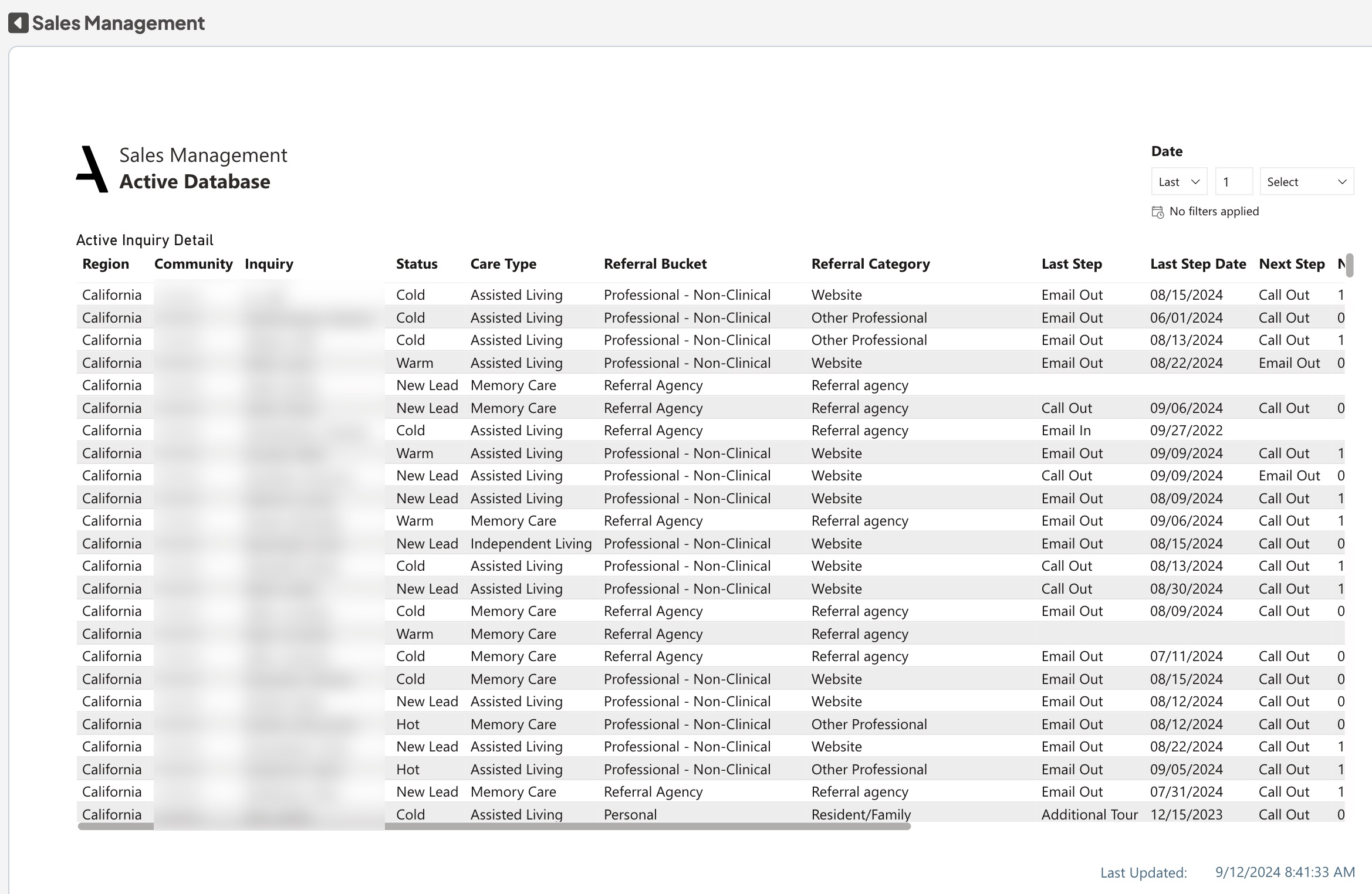
The number of inquiries in an active selling status. Active statuses include Cold, Hot, New Lead, ReEngaged, Reserved, Wait List, Warm.
Was this article helpful?
That’s Great!
Thank you for your feedback
Sorry! We couldn't be helpful
Thank you for your feedback
Feedback sent
We appreciate your effort and will try to fix the article