Overview
In this article, we will review how to manually upload DocuScans.
Manual DocuScan Upload
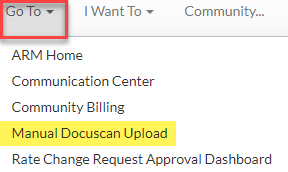
Step 1: Starting on the Resident Management home page, click the Go To menu, then select Manual DocuScan Upload.
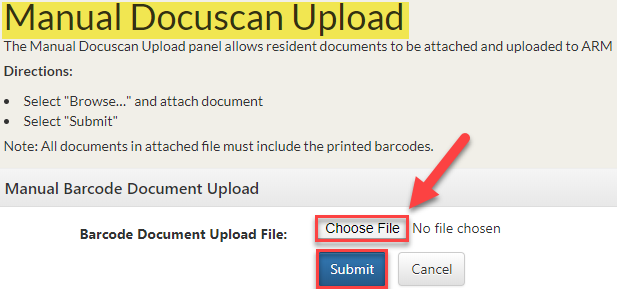
Step 2: On the Manual DocuScan Upload page, click Choose File to select a Barcode Document.
Note: The document must be in PDF format.
Step 3: Click Submit.
Was this article helpful?
That’s Great!
Thank you for your feedback
Sorry! We couldn't be helpful
Thank you for your feedback
Feedback sent
We appreciate your effort and will try to fix the article